
Download AI Answers Pro – AI tutoring, image‑based Q&A, instant learning tool
Overview
AI Answers Pro is a subscription‑based web application that redefines the way learners interact with digital knowledge. Built on cutting‑edge artificial intelligence, the platform allows users to submit both text queries and images, enabling the AI engine to interpret visual information and deliver precise, context‑aware answers within seconds. A standout feature is the integrated personal tutor, “Sage,” which tailors explanations, suggests follow‑up resources, and adapts its teaching style to match each user’s learning pace.
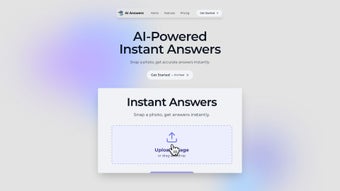
The interface is deliberately minimalist, offering drag‑and‑drop image uploads, a clean chat‑style dialogue window, and instant feedback that feels like a conversation with a knowledgeable mentor. Whether you’re a student tackling homework, a professional seeking quick clarification, or a lifelong learner exploring new topics, AI Answers Pro provides a secure, cloud‑based environment that requires no local installation, making it accessible from any modern browser. While the system shines with high‑resolution images and clear textual prompts, it does depend on quality uploads and may struggle with highly complex scientific diagrams or low‑contrast photos.
Nonetheless, its blend of speed, accuracy, and personalized tutoring positions it as a compelling addition to any learning toolkit. The service also incorporates robust privacy safeguards, GDPR compliance, and regular model updates that keep the knowledge base fresh. In short, AI Answers Pro is designed to turn curiosity into rapid, reliable answers without the friction of traditional search engines or fragmented note‑taking apps.
Key Features & Benefits
AI Answers Pro packs a comprehensive set of capabilities that go beyond simple Q&A. Each feature is engineered to accelerate learning, reduce friction, and provide a personalized experience that scales with the user’s needs. Below is a detailed look at the most valuable tools the platform offers.
- Image‑Based Question Solving: Upload photos, screenshots, or handwritten notes; the AI extracts visual cues, performs OCR, and delivers relevant answers. Supports complex charts, textbook excerpts, and even whiteboard sketches.
- Personal AI Tutor “Sage”: Adaptive guidance that remembers past interactions, suggests next steps, and customizes explanations. Sage can switch between concise bullet points, in‑depth walkthroughs, or interactive quizzes based on user preference.
- Instant Real‑Time Responses: Answers are generated in seconds, reducing the time spent searching multiple sources and allowing learners to stay in the flow of study.
- Cross‑Platform Web Access: No downloads required; works on Windows, macOS, Linux, ChromeOS, Android, and iOS browsers. The responsive UI automatically adapts to desktop, tablet, and mobile screen sizes.
- Secure Cloud Architecture: End‑to‑end encryption protects user data, sessions are isolated per subscriber, and the platform complies with GDPR and CCPA regulations.
- Extensive Knowledge Base: Trained on millions of documents, textbooks, scholarly articles, and open‑source resources, providing broad subject coverage from mathematics to philosophy.
- Learning History Dashboard: Track questions, view AI explanations, monitor progress, and export conversation logs as PDFs or CSV files for offline review.
- Multi‑Language Support: Handles queries in English, Spanish, French, German, and Mandarin with comparable accuracy, and additional languages are being added regularly.
- Subscription Flexibility: Choose between monthly or annual plans, benefit from a free 7‑day trial, and enjoy discounted rates for students and educational institutions.
- Continuous Updates: The AI model, UI, and security layers are refreshed automatically, ensuring users always have the latest features without manual intervention.
Installation, Compatibility & How to Use AI Answers Pro
Because AI Answers Pro is a cloud‑first service, getting started is a matter of minutes rather than hours. Follow the steps below to create an account, understand system requirements, and master the core workflow.
Step‑by‑Step Sign‑Up Process
1. Navigate to the official website at https://www.aianswerspro.com and click “Start Free Trial.”
2. Enter your email address, create a strong password, and accept the terms of service.
3️⃣ Verify your email via the link sent to your inbox.
4️⃣ Log in to the dashboard, where you’ll be greeted by Sage, the AI tutor, and a brief onboarding tour that explains key UI elements.
Device Compatibility
Web (compatible with all modern browsers: Chrome, Edge, Firefox, Safari, and Opera). The platform automatically adjusts to desktop, tablet, and mobile screen sizes, ensuring a seamless experience on Windows, macOS, Linux, Android, and iOS devices.
Core Usage Workflow
- Initiate a Query: Click “New Question” to open a chat window. Type your question or select a pre‑filled template for common topics.
- Upload Visual Input (Optional): Use the paper‑clip icon to drag‑and‑drop or browse for an image file. Supported formats include JPEG, PNG, GIF, and PDF. For best results, ensure the image is well‑lit and at least 800 × 600 px.
- Configure Sage’s Teaching Mode: Choose between “Concise,” “Detailed,” or “Interactive” to control the depth of the explanation.
- Submit and Review: Press “Enter” or click “Send.” Within seconds, AI Answers Pro returns a text response and, when applicable, highlights the portions of the image that informed the answer.
- Save & Track Progress: Click “Save to Dashboard” to store the interaction. The History tab lets you filter by subject, date, or difficulty, and you can export conversations for offline study.
- Provide Feedback: Use thumbs‑up/down icons to rate the answer. Positive feedback helps fine‑tune the model, while constructive criticism improves future responses.
Additional usability features include keyboard shortcuts (e.g., Ctrl + Enter to send), a dark‑mode toggle for low‑light environments, and multi‑tab support that lets you run several queries side‑by‑side. Because all processing occurs on secure servers, even low‑end devices experience fast response times without draining battery or CPU resources.
Pros, Cons, Frequently Asked Questions & Conclusion
Before you decide whether AI Answers Pro fits your learning workflow, it helps to weigh the strengths and limitations of the platform. Below you’ll find a balanced list of pros and cons, followed by answers to the most common questions and a final recommendation.
Pros
- Fast, accurate answers for both text and image‑based queries, dramatically cutting research time.
- Personalized tutoring with the AI “Sage” that remembers user preferences and adapts explanations.
- Zero‑install, cross‑platform accessibility via any modern browser, eliminating device‑specific barriers.
- Robust security with end‑to‑end encryption, GDPR compliance, and isolated user sessions.
- Comprehensive knowledge base covering a wide range of subjects, continuously updated by the provider.
- Intuitive dashboard that tracks learning history, supports export, and integrates with common LMS tools.
- Multi‑language support, making the tool useful for non‑English speakers and international classrooms.
Cons
- High‑quality image uploads are essential; low‑resolution or poorly lit photos can reduce answer accuracy.
- Complex scientific diagrams, heavily annotated charts, or niche subject matter may be misinterpreted.
- The subscription pricing may be a barrier for occasional users or those on a tight budget.
- Requires a constant internet connection; offline functionality is currently unavailable.
- Language support, while broad, does not yet include all regional languages or dialects.
Frequently Asked Questions
Can I use AI Answers Pro on a mobile device?
Yes. The web app is fully responsive and works on Android and iOS browsers. All features, including image upload and Sage tutoring, are available on smartphones and tablets.
What file formats are supported for image uploads?
AI Answers Pro accepts JPEG, PNG, GIF, and PDF (for scanned documents). For best results, use clear, well‑lit photos with a resolution of at least 800 × 600 px.
Is my data stored securely?
All communications are encrypted with TLS 1.3, and user data is stored in encrypted databases. Sessions are isolated per subscriber, and the platform complies with GDPR and CCPA standards.
How does the free trial work?
You receive a 7‑day trial with unlimited queries and full access to Sage. No credit card is required; after the trial, you can choose a monthly or annual plan, or simply let the account expire.
Can I integrate AI Answers Pro with other learning platforms?
Currently, integration is limited to exporting conversation logs as PDFs or CSV files, which can be imported into most LMS tools. Future updates aim to provide direct API access for deeper integration.
Conclusion & Call to Action
AI Answers Pro delivers a powerful blend of instant, image‑aware answering and personalized tutoring that few learning tools can match. Its cloud‑first design removes barriers of installation, while Sage’s adaptive guidance makes every interaction feel tailored to the individual. For students who need quick clarification, professionals seeking on‑the‑fly assistance, or lifelong learners craving a responsive study partner, the platform offers a secure, fast, and engaging experience.
Although the reliance on high‑quality images and the subscription model are considerations, the overall value—especially for frequent users—far outweighs these drawbacks. With regular AI model upgrades, a responsive support team, and a 7‑day risk‑free trial, AI Answers Pro stands out as a modern, scalable solution for anyone serious about improving knowledge acquisition. Ready to transform the way you learn?
Start Your Free Trial of AI Answers Pro Now and experience AI‑driven tutoring without any commitment.
AI Answers Pro impresses with its speed, breadth of knowledge, and the unique ability to interpret images. Sage’s personalized approach makes it feel like a private tutor, and the secure, browser‑based experience is ideal for students and professionals alike. Minor issues with image quality and subscription cost keep it from a perfect score, but overall it’s a game‑changing tool for modern learners.



.png)



